
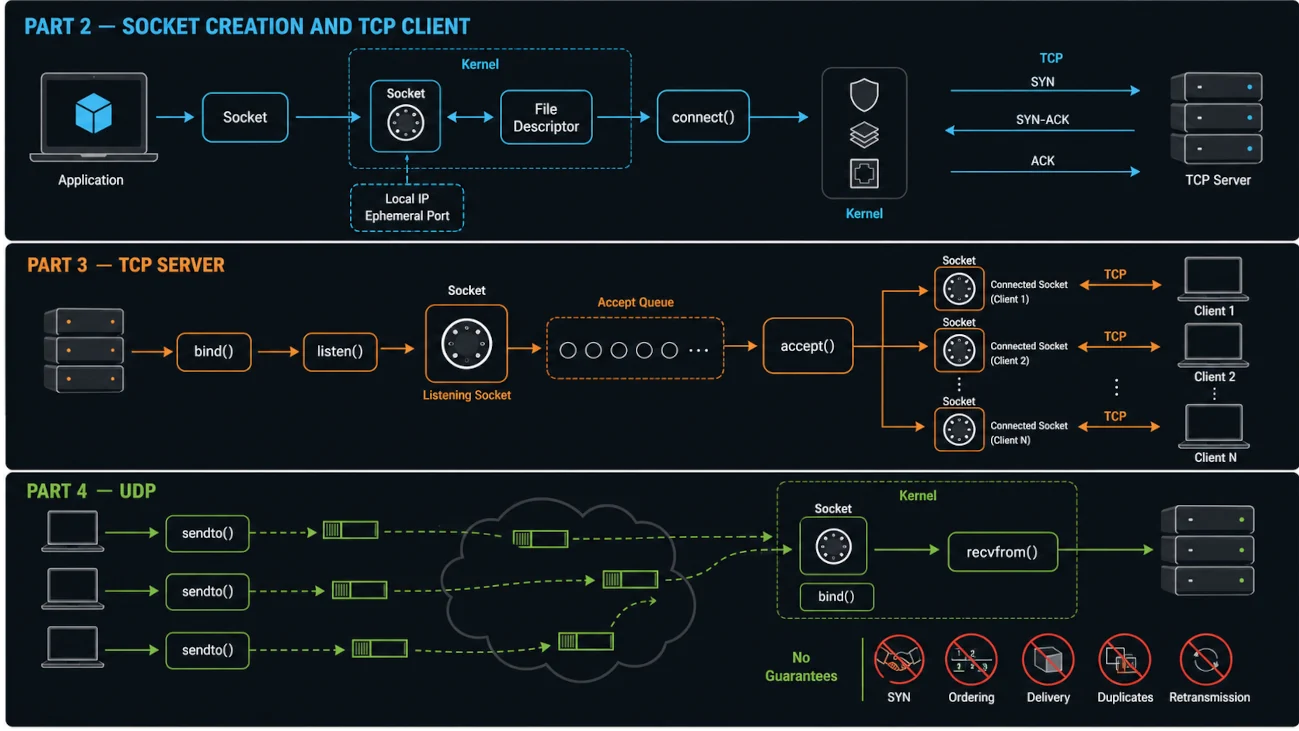
The First Path: Connecting to a Socket and sending data from the perspective of the client. It is time now to discuss the process from the other side: the Server.
Path B: You are a server
You are a server waiting for others to connect. This changes almost everything except the first step, which is obtaining the Socket through the socket() call.
Again, this path applies only to connection-oriented protocols such as TCP. UDP servers do not need to call
listen() or accept(). Instead, the typical flow is:
bind()
recvfrom()
So the server calls socket(), and now it has a File Descriptor that refers to a kernel-managed Socket object. But it does not have an identity yet and does not know which address it will be reachable on.
First: Binding the Socket
We need to provide this call with a few pieces of information:
- Which Socket we are binding our server to.
- What address, consisting of IP + Port, this Socket should have.
Again, a server may have multiple Network Interfaces, and each one can have a different IP Address: 127.0.0.1 for Loopback, 192.168.1.10 for the local LAN, and 203.0.113.25 for a Public IP. The OS needs to know on which Interface it should accept packets arriving at this Socket.
This IP Address is the address that clients will send data to.
What about the Port Number? Your machine can run many servers, and they may all use the same IP Address. The OS therefore needs to know which server should receive each incoming packet.
A server usually knows which Port it should listen on because clients need a consistent and predictable way to access it. By convention, browsers use Port 443 for HTTPS unless you explicitly specify a different port. SSH clients use Port 22 by default, DNS uses Port 53, and PostgreSQL commonly uses Port 5432.
We also need to provide the length of the address we passed. Again, the application lives in User Space while the kernel lives in Kernel Space. They do not share the same memory, so the kernel needs to know exactly how many bytes it should read from User Space to retrieve the complete address.
This makes the bind() call look like this:
bind(sockFileDescriptor, localAddress, sizeof(localAddress));So we are telling the kernel: “OS, bind this Socket to 0.0.0.0:8080.”
The kernel then checks whether this Port is available. If it is already in use, the call fails with an “Address already in use” error.
If the Port is available, the kernel adds this address, consisting of the IP and Port, to the Socket object.
So now this Socket has an address, but a TCP socket is still in the CLOSED state until listen() changes it to LISTEN. It is not yet accepting connections or carrying application data.
Second: Listening for Connections
Our Socket has an address now, but we have not yet told the OS what kind of role this Socket will have. Will it wait for incoming connections as a server, or will it initiate connections as a client?
Since we are talking about Connection-Oriented TCP, a client needs to send a SYN when starting the connection. At that point, the server Socket needs to be ready to receive and handle those incoming connection requests.
That is the role of the listen() call. In C, it looks like this:
listen(sockFileDescriptor, backlog);The backlog is a hint and limit for pending connections waiting to be accepted. Operating systems may maintain separate queues for incomplete and completed handshakes, and may apply additional kernel limits.
This call changes the Socket’s state from “unconnected” to “listening”.
It also allocates internal data structures for two queues: the SYN Queue, which stores incoming SYN packets representing requests to start the handshake, and the Accept Queue, which stores connections that have completed the handshake but have not yet been accepted by the application.
By calling listen(), we have defined this Socket as a Passive Socket. It receives connection requests; it does not initiate them.
Third: Accepting Connections
Now our Socket has an address and is ready to receive connections. We need to accept those connections. But think about what happens when many clients connect at the same time. Each client represents a different TCP connection because a TCP connection is identified by a four-tuple: local IP address, local Port, remote IP address, and remote Port.
Imagine that we receive two connections from different remote addresses, such as 203.0.113.5:54321 and 198.51.100.22:61000. How can our server treat them as two different connections if we use the same Socket and the same memory to communicate with both of them?
That is why the Socket that listens for connections cannot do much more than act as a Listening Socket. Its role is to receive connection requests and queue them until the application accepts them. Nothing more.
So what do we use for an accepted connection? Where can we receive data from that client and send responses back to it? Clearly, we need another Socket.
This means that for each accepted connection, the kernel creates a brand-new Socket. The application receives a new file descriptor by calling accept():
int clientSocket = accept(serverSocketFD, NULL, NULL);Under the hood, this is what the OS does.
First, the OS checks the Accept Queue, which stores connections whose handshakes have already completed. If the queue is empty, accept() blocks until a new connection arrives.
If there is a connection in the queue, something similar to what happens when we call connect() on the client side takes place. The OS creates a new Socket object in kernel memory, sets its state to “connected”, copies the remote and local addresses into this Socket object, allocates Send and Receive Buffers, and finally returns a brand-new File Descriptor that points to this new Socket.
This means that each client gets its own dedicated Socket. Think of it this way: the Listening Socket is responsible only for receiving new connection requests, while each accepted client gets a separate Socket through which the server can receive data and send responses.
This is the key reason our server can handle multiple TCP connections at the same time. One Listening Socket can accept many connections, and each accepted connection gets its own dedicated Socket and File Descriptor.